Category: Uncategorized
-
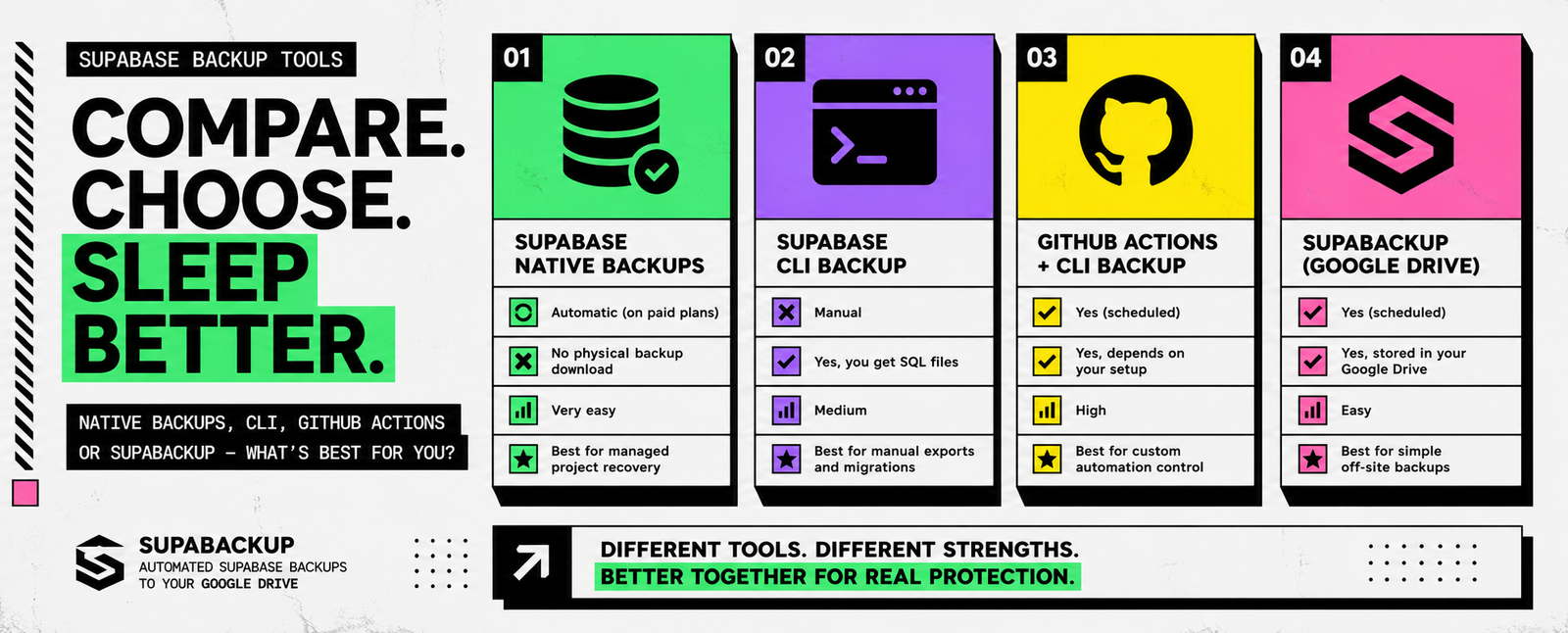
Supabase Backup Tools Compared: Native Backups vs CLI vs GitHub Actions vs SupaBackup
There is no single “best” way to back up a Supabase database. The right option depends on what you actually need. Do you want to quickly restore your production project? Do you need a downloadable database copy? Do you want automatic off-site backups? Or do you want full control over your own backup scripts? For…
-
Supabase CLI Backup Guide: How to Dump Roles, Schema, and Data
Need a portable backup of your Supabase database? The Supabase CLI lets you create a logical database backup using supabase db dump. For a complete backup workflow, Supabase currently recommends exporting your database into three separate files: These files contain your database roles, structure, and actual records. The basic commands are: This is the current…
-
Supabase Physical vs Logical Backups: What Developers Need to Know in 2026
If you use Supabase, you may have noticed that database backups work differently from older tutorials you find online. Some guides show a downloadable backup.gz file. Others tell you to run pg_dump or supabase db dump. Meanwhile, newer Supabase projects use physical backups by default. So which backup type should you actually use? The short…
-
Why Can’t I Download My Supabase Backup? Physical Backups, PITR & CLI Explained
You open your Supabase dashboard, go to Database → Backups, see that your project has backups available, but there is no obvious option to download the backup file. Nothing is necessarily wrong. Supabase has changed how backups work for newer projects. Projects running Postgres 15.8.1.079 or later now use physical backups by default, and these…
-

How to Manually Back Up a Supabase Database
Automatic backups are convenient, but there are still times when creating a manual Supabase backup makes sense. Maybe you are about to run a database migration. Perhaps you want an extra copy before importing thousands of records. Or maybe you are using the Supabase Free plan and want to keep your own database backups. Whatever…
-
How to Export a Supabase Database: CLI, CSV, and Automatic Backups
There are several reasons you may need to export a Supabase database. You may want to create a backup, move data to another project, inspect production data locally, prepare for a migration, or keep an independent copy outside Supabase. However, not every export method produces the same result. Downloading one table as a CSV is…
-

How to Back Up Supabase on the Free Plan
Supabase’s Free plan is an excellent way to build prototypes, personal projects, and early-stage SaaS products. However, there is one important limitation: Free plan projects do not receive the same automatic daily database backups available on paid plans. This means you need to create and store your own backups. Waiting until your project becomes profitable…
-
How to Back Up Supabase Storage Files
Backing up your Supabase database does not automatically protect every file in your project. Your database backup may preserve information about Storage objects, such as bucket names, file paths, and metadata. However, it does not contain the actual images, PDFs, videos, invoices, or documents stored inside your buckets. This difference can create a serious recovery…
-

Supabase Backup Strategy for Agencies Managing Multiple Client Projects
Managing one Supabase project is usually straightforward. Managing ten client projects is different. Each client may have a separate database, Google Drive account, access policy, backup schedule, retention requirement, and recovery expectation. Without a standard process, backups quickly become inconsistent. One project may have automatic backups. Another may depend on manual exports. A third may…
-

Supabase Point-in-Time Recovery vs Daily Backups: Which Do You Need?
Supabase provides built-in database backup options, but choosing the right one can be confusing. Is a daily backup enough? Should you enable Point-in-Time Recovery? Do you still need an independent copy outside Supabase? The answer depends on how active your application is and how much recent data you can afford to lose. For a small…